
Reading time can reflect interest, confusion or an interrupted screen. Your editorial job is to make a useful idea understandable, not to keep people waiting for a payoff.
The decision this guide helps you make
LinkedIn has publicly discussed dwell time in feed engineering. That does not reveal a current weighting formula or prove that a longer post will outperform a concise answer.
A practical workflow
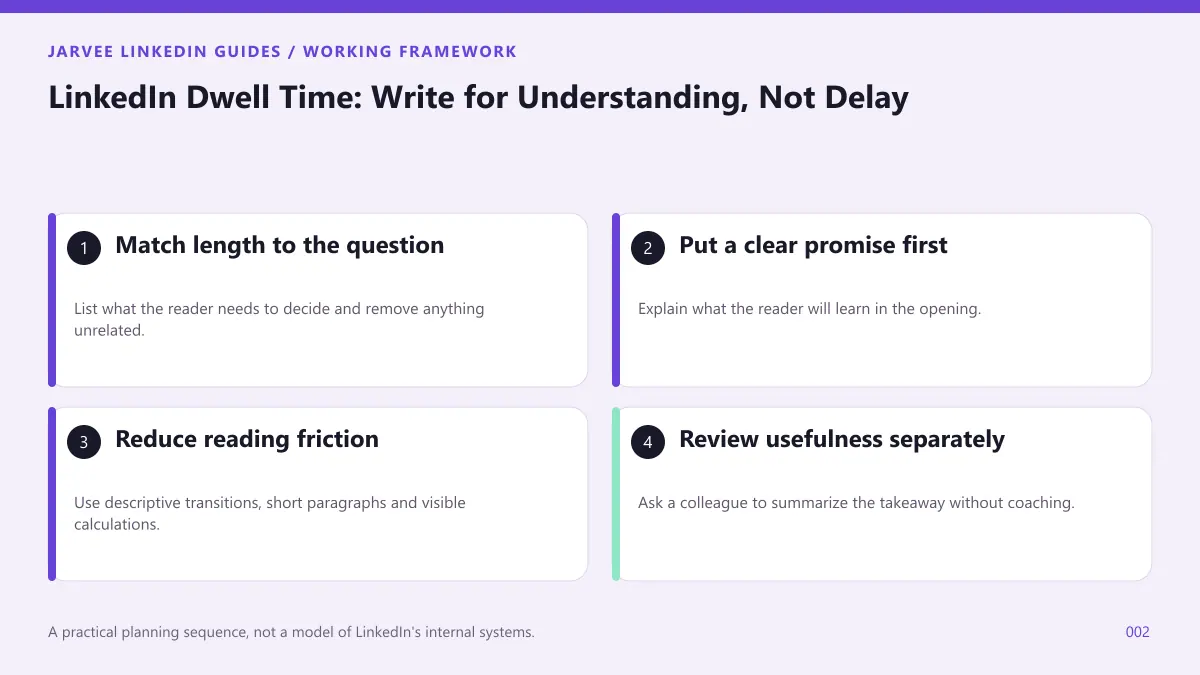
1. Match length to the question
List what the reader needs to decide and remove anything unrelated. A checklist may need six lines; a complicated procurement tradeoff may need an example and a caveat.
2. Put a clear promise first
Explain what the reader will learn in the opening. Avoid vague suspense that requires opening the full post just to discover its subject.
3. Reduce reading friction
Use descriptive transitions, short paragraphs and visible calculations. Define unfamiliar terms before using them to support a recommendation.
4. Review usefulness separately
Ask a colleague to summarize the takeaway without coaching. If they remember the hook but cannot explain the action, revise the body before testing another headline.
An illustrative application
An illustrative pricing post opens with a renewal question, shows a simple cost comparison and ends with a decision checklist. A reader can act immediately; extra examples are available for people who need more detail.
Distinguish useful depth from avoidable effort
Depth means supplying the information a reader needs to understand a decision. Effort means the work required to extract that information. A detailed example can increase depth while reducing effort because it replaces vague instructions with something concrete. Conversely, a short but jargon-heavy post may be difficult to use even though it takes little space.
Review a draft sentence by sentence and ask what each part contributes. Necessary context explains an assumption. Evidence supports a claim. A limitation prevents a reader from applying advice in the wrong situation. Repeated promises, ceremonial introductions and unexplained suspense usually do none of those jobs. Removing them can improve the experience without turning the explanation into a slogan.
Use an example to test the explanation
Imagine a post explaining how to compare two software renewal options. The useful detail includes the same time period, the same scope and the implementation assumptions for both options. A reader should not have to search the comments to discover that one price excludes migration. Place that qualification beside the comparison, where it changes the decision.
After drafting, ask a colleague to use the explanation with a different fictional example. If they need repeated clarification, identify the missing definition or assumption. Do not respond by adding more dramatic opening lines. The problem is in the explanation, and the comprehension test gives you a direct way to improve it.
Keep attention claims proportional
Ordinary post analytics do not provide a complete account of what every reader thought or how carefully they read. A person can save a post for later, open it accidentally or share it because they disagree. Those actions can be informative, but they need interpretation. Treat them as observations alongside relevant questions rather than as direct measurements of intellectual attention.
Your best practical objective is therefore a clear, worthwhile reading experience. Make the answer available, show enough reasoning to support it and give interested readers a sensible place to continue. If you test different lengths, preserve that standard in both versions. Comparing a thoughtful short explanation with an intentionally padded long one tells you little about length itself.
Check whether the detail earns its place
Consider a training provider explaining how to prepare a workshop brief. A useful longer version might include audience needs, prerequisites and a sample exercise. An unhelpful longer version might repeat why training matters without showing how to prepare anything. Both occupy more space than a short note, but only one adds usable depth. During review, highlight every passage that enables a decision or prevents a misunderstanding. Remove material that merely restates the promise. This gives the editor a practical test for length that does not depend on an unsupported claim about how long a viewer should remain on screen.
A working exercise
Run a comprehension review on a draft. Give a colleague the opening and ask what answer they expect, then give them the complete piece and ask what they would do next. Compare those responses before looking at analytics. This test evaluates the explanation directly without pretending to measure an invisible audience behavior.
A review checklist
| Review point | Question to answer |
|---|---|
| Promise | Explain one renewal comparison |
| Necessary detail | Cost, responsibility and implementation assumptions |
| Friction to remove | A long introduction before the answer |
| Useful response | A reader can repeat the decision rule accurately |
What to measure
Track saves, relevant questions and visits to the supporting resource where those measurements are available. Do not pretend you can read every viewer's dwell time from ordinary post analytics.
A mistake worth avoiding
Excessive line breaks, endless carousel slides and deliberately incomplete answers can create friction without creating value.
Where a tool fits in this workflow
For a product-specific reference, review SMTasker LinkedIn post workflow. A prepared publishing workflow should carry an approved explanation, not become a reason to make the draft longer. Review the opening, necessary detail and accessible presentation before execution. Keep the comprehension test with the editorial record so a production operator does not substitute a supposed attention target for the reader's actual question. Any tool use must be assessed against LinkedIn’s rules; device type does not guarantee permission or freedom from restrictions.
Frequently asked questions
Should every LinkedIn post be long?
No. Use enough space to answer the question and explain necessary qualifications; remove length that does neither.
Is a save proof that someone read everything?
No. It indicates an action, not a complete record of the person's attention or understanding.
Continue with the next useful question
Related guidance: A weekly LinkedIn workflow for B2B teams; How the LinkedIn Feed Works: A Practical Guide to Relevance.
Official reference: LinkedIn engineering on dwell time. Check current official guidance and the options available in your own account when applying feature-specific advice.